IMPORTANT: The Provider Portal launch has been delayed to Jan. 1, 2027.
When the new Provider Portal goes live on Sept. 1, remittance advices (RAs) for dates of service beginning Sept. 1, 2026, will be automatically available on your portal account. However, if you need to see RAs from dates of service prior to Sept. 1, you’ll need to add the Remittance Review staff role on our new Provider Portal. If you don’t do this by the time our new Provider Portal goes live, you won’t have immediate access to past RAs.
Adding the Remittance Review staff role
There are two ways to add the Remittance Review role:
- Select the role when requesting an account. Under Additional Information, select Remittance Review as one of your staff roles. Note that you may select multiple roles (so, for example, you could select Billing & Coding in addition to Remittance Review).
- Add the role after you receive access to your account. If you’ve already registered for your new Provider Portal account, no worries. After logging in, go to Menu > Settings > Roles and Specialties and enter Remittance Review into the box under Staff Roles. (Again, there’s no limit here to the number of staff roles you can select.)
Viewing the remittances
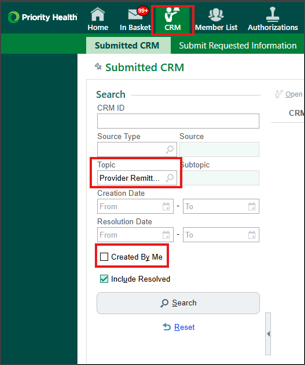
RAs from before Sept. 1 will be viewable in your Provider Portal in your CRMs under the topic “Provider Remittance Advice”. When you’re searching for these, be sure to uncheck the Created By Me box.
How far back will the remittances go?
RAs dating from 180 days before Sept. 1 will be available via CRM. If you need RAs from before that, call our Provider Services line.
Still need to request an account?
Check out our Getting Started page for details.